Bill every hour.
From your menu bar.
ShinyTimer is a native macOS time tracker built for freelancers who bill by the hour. Clients, projects, timesheets, reports, and invoicing data are always one click away.
Free to start · Pro from $3.99/mo · macOS 14.6+
Always one click away.
ShinyTimer lives in your menu bar, with no dock icon unless the main window is open. Click the timer to open the popup, start or stop tracking, and switch projects without breaking your flow.
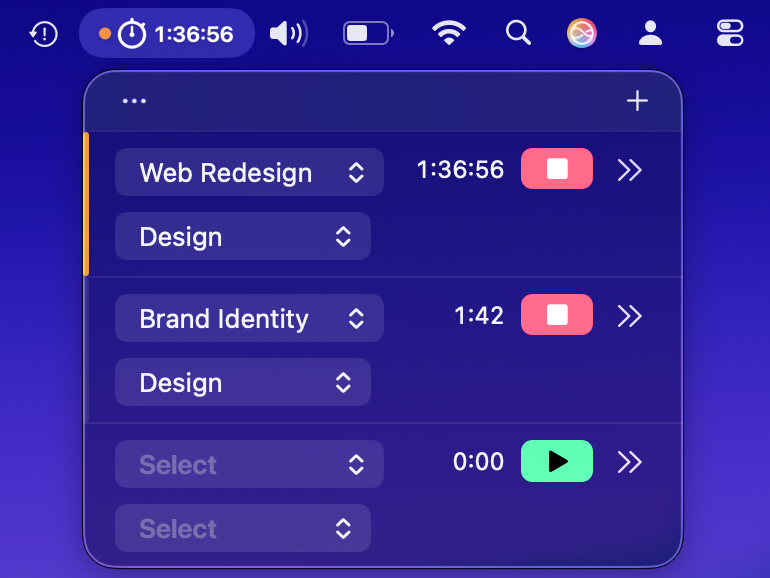
Menu bar popup · Always one click away
Your week at a glance.
A familiar grid layout with projects as rows, and days as columns. Click any cell to edit. Log hours in seconds, not minutes. Navigate by day or week with keyboard shortcuts.
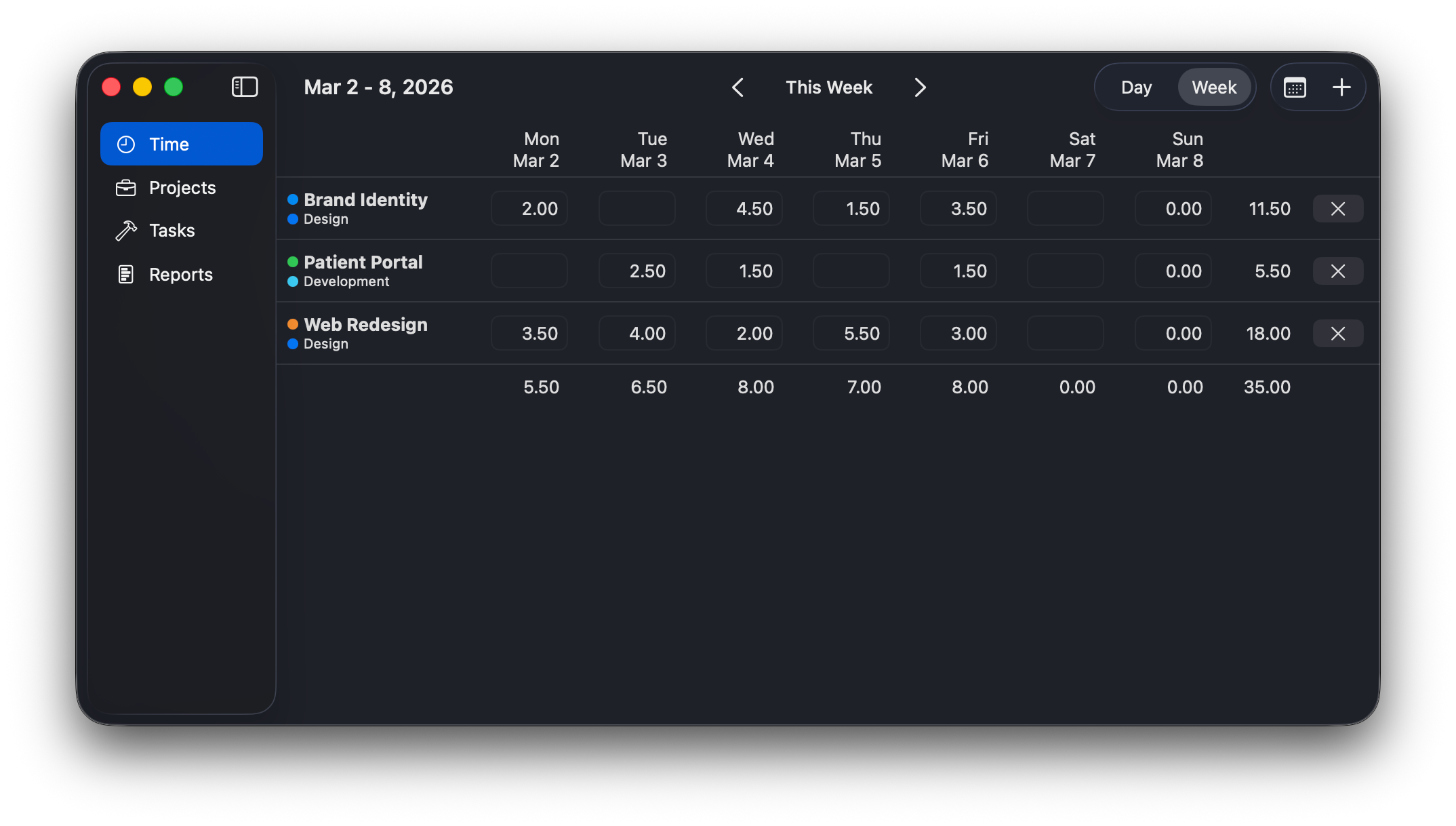
Weekly timesheet · Projects × days · Click to edit
Everything a freelancer
needs to get paid.
Track time, organize by client and project, generate reports, and export invoicing data without leaving your menu bar.
Menu Bar Timer
Start, stop, and assign projects from a lightweight popup in your menu bar. The dock icon only appears while the main window is open. Just your timer, always one click away.
Clients, Projects & Tasks
A three-level hierarchy built for billing. Assign hourly rates per client or project, mark tasks as billable or non-billable, and see charges calculated automatically.
Reports & Analytics
See time summaries by week, month, year, or all time. Drill into any project, client, or task for detailed breakdowns with color-coded charts.
Desktop Widget
A native macOS widget shows your active timer, daily total, and an hourly activity chart right on your desktop. Available in small and medium sizes with live updates.
CSV Import & ExportPro
Export a 12-column invoice-ready CSV with one shortcut. Import from other tools with automatic project and client matching. RFC 4180-compliant with formula injection protection.
iCloud SyncPro
Keep everything in sync across all your Macs. Time entries, projects, clients, and tasks travel with you via native CloudKit integration.
Siri & Shortcuts
Start, stop, check status, and log time with your voice or custom automations. Full App Intents support for the Shortcuts app.
Keyboard-First
Navigate views, create entries, manage projects, and export data without touching the mouse. Plus a global hotkey (⌃⇧T) from any app.
Away Detection
Forgot to stop the timer? ShinyTimer notices when you step away and alerts you with a configurable threshold and custom system sounds. Timers that run past midnight are split by day automatically.
In detail: Menu bar time tracker for Mac, Mac time tracker with a desktop widget, Native Mac time tracker, Weekly timesheet for Mac
Your timer. On your desktop.
A native macOS widget brings your running timer, active project, and daily activity chart right to your desktop without opening any windows. Available in small and medium sizes with live updates.
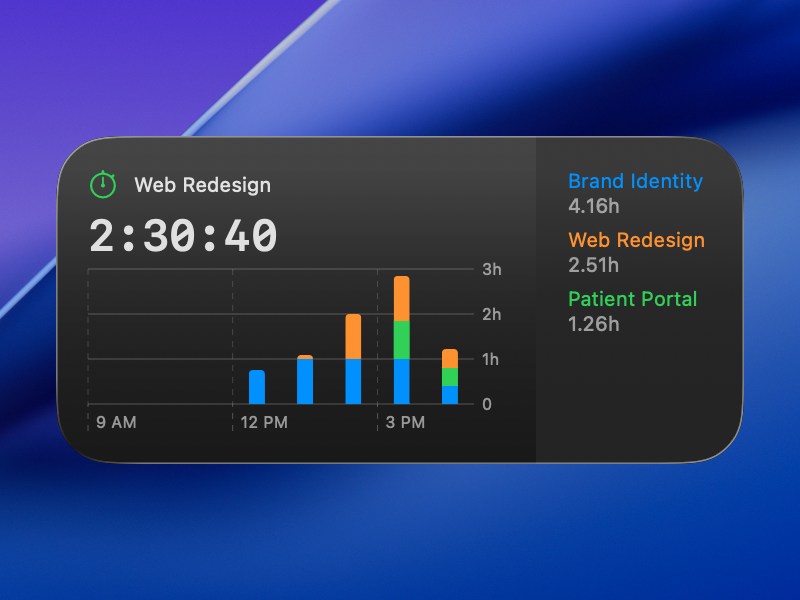
Desktop widget · Small & medium sizes
Hey Siri, start my timer.
Control ShinyTimer with your voice or build custom automations in the Shortcuts app.
Start free. Go Pro
when you're ready.
Core time tracking is free, forever. Unlock the full professional toolkit with Pro.
- ✓Menu bar timer with start/stop
- ✓Up to 5 projects
- ✓30 days of history
- ✓Weekly reports
- ✓Desktop widget
- ✓Siri & Shortcuts
- ✓Global hotkey (⌃⇧T)
- ✓Time rounding & away alerts
- ✓Everything in Free, plus:
- ✓Unlimited projects & clients
- ✓Full time tracking history
- ✓Monthly, yearly & all-time reports
- ✓Hourly rates & billable tracking
- ✓CSV export (invoice-ready, 12 columns)
- ✓CSV import from other apps
- ✓iCloud sync across all Macs
The short version.
- Price
- Free to start
- Free covers up to 5 projects and 30 days of history. Pro is $3.99 a month or $29.99 a year, with a free trial for new subscribers.
- Requirements
- macOS 14.6 or later
- A native Mac app written in SwiftUI, from the Mac App Store.
- After tracking
- A CSV for your invoicing tool
- Export your hours as a 12-column CSV, ready for the invoicing tool you already use. ShinyTimer tracks the time; it is not an invoicing app. CSV export is part of Pro.
Made for Mac.
Made for freelancers.
See how ShinyTimer stacks up against other macOS time trackers.
| ShinyTimer Pro | Klokki | Tyme | Timing | |
|---|---|---|---|---|
| Menu bar timer | Yes | Yes | Yes | Yes |
| Clients and projects | Yes | Projects and tasks | Yes | Yes |
| Weekly timesheet grid | Yes | Not listed | Not listed | Not listed |
| Desktop widget | Yes | Not listed | Notification Center | Not listed |
| Siri and Shortcuts | Yes | Not listed | Yes | Not listed |
| Sync across Macs | Yes | No | Yes | Yes |
| CSV import and export | Yes | Not listed | Yes | CSV export |
| Hourly rates and billable time | Yes | Yes | Yes | Billable status |
| Global hotkey | Yes | Custom shortcuts | Yes | Yes |
| iPhone and iPad app | No | Not listed | Yes | Web app |
| Price | $29.99/yr | $30 one-time | $59.99/yr | $108/yr |
Competitor facts read on , from each app's own pages.
Sources: Klokki: klokki.com. Tyme: tyme-app.com/en/all-features, tyme-app.com/en/faq, tyme-app.com/en/pricing. Timing: timingapp.com/help/preferences, timingapp.com/help/projects, timingapp.com/features, timingapp.com/help/sync, timingapp.com/help/reports, timingapp.com/pricing, timingapp.com/help/faq.
Compare in detail: ShinyTimer vs Clockify, ShinyTimer vs Harvest, ShinyTimer vs Timing, ShinyTimer vs Toggl, ShinyTimer vs Tyme, Best Mac time trackers for freelancers
Start tracking.
Start billing.
Download ShinyTimer free from the Mac App Store and see why freelancers are switching.